
openGym for Home Assistant puts your workouts where they belong: in your automations. Instead of progress living inside a gym app, finished workouts, personal records and weigh-ins trigger Home Assistant automations directly — and 15+ sensors, calendars and two Lovelace cards bring the rest onto your dashboards.
It works on two tracks: ⚡ real-time via signed webhooks from openGym, and 🔄 background polling of the openGym API for plan, muscle coverage, best weights and streaks.
✨ Features
| Feature | What it does |
|---|---|
| 🏋️ 15 core sensors | Last workout, weekly volume, streak, next session, estimated 1RM and more |
| 🧬 Muscle card in the dashboard | Lovelace card with openGym’s real body map: weekly sets vs. target zones, recovery and strength |
| ✅ “Trained today / this week” | The most useful triggers for automations |
| 📆 Workout history | Completed workouts as calendar events for the native Calendar card |
| 💪 28 muscle sensors | Idle days and recovery status for 14 muscle groups, from openGym’s real muscle map (246 exercises) |
| 🟢 Live training | binary_sensor.opengym_active_workout shows whether you’re actually lifting right now |
| 🔔 Device triggers & actions | Automations without YAML: “When the openGym device finishes a workout …” |
| ⚖️ Two-way | log_weighin writes the scale back into openGym; trigger_test_event tests the wire |
| 🪄 Auto-webhook | On pairing, the integration sets up the webhook connection in openGym itself |
| 🔐 Secured | HMAC-SHA256 signature checks, pairing code instead of passwords, automatic re-auth |
| 🩺 Diagnostics & repairs | Errors surface as clickable repair hints in the HA UI, plus a config dump for issue reports |
| ⬆️ Update badge | update.opengym_* shows when your instance lags behind the official release |
📋 Requirements
- Home Assistant 2024.7 or newer (uses
ConfigFlowResult,ConfigEntrygenerics andStaticPathConfig) - A self-hosted openGym instance — webhooks only work on your own deployment, not the hosted app
- Home Assistant reachable from the openGym server for webhooks (LAN is enough when
INTEGRATIONS_ALLOW_LAN=1)
🚀 Setup
1. Prepare openGym
Webhooks need the self-hosted instance. In the .env:
INTEGRATIONS=webhook
INTEGRATIONS_ALLOW_LAN=1   # only if HA is in the same LAN
Then restart the api container.
2. Install the integration
HACS (recommended): HACS → ⋮ → Custom repositories → add JImmyB0nes/OpenGym-HomeAssistant with category Integration → download openGym → restart Home Assistant.
git clone https://github.com/JImmyB0nes/OpenGym-HomeAssistant
cp -r OpenGym-HomeAssistant/custom_components/opengym <config>/custom_components/
3. Pair
- Settings → Devices & Services → Add Integration → openGym and enter your instance URL.
- In openGym, go to Settings → Integrations → “Link the app” and create a code (valid 5 min); enter it in the dialog.
- Tick “Set up webhook automatically” — the integration creates the webhook connection in openGym and adopts the signing secret itself. Otherwise copy the shown webhook URL (
/api/webhook/…) into openGym manually.
X-OpenGym-Signature (HMAC-SHA256 over t=<timestamp>.<body>, 5-minute window, timing-safe). No passwords — access runs through a pairing code, the token renews automatically.📊 What the integration creates
Core sensors include sensor.opengym_last_workout, …_week_volume, …_streak, …_days_since_workout, …_next_session, …_best_one_rm and …_muscle_balance. The muscle map feeds 28 per-group sensors like sensor.opengym_muscle_chest and binary_sensor.opengym_muscle_deltoids_recovering, plus binary_sensor.opengym_worked_out_today and …_this_week as the go-to triggers. Two calendars (calendar.opengym_training_plan and …_workout_history) keep the plan and the history visible, and the device openGym offers device triggers for workout finished, new personal record and weigh-in logged.
| openGym event | Home Assistant event |
|---|---|
workout.finished | opengym_workout_finished |
workout.pr | opengym_personal_record |
weighin.logged | opengym_weighin_logged |
🧬 The muscle card in your dashboard
Since v0.7.0 the integration ships ready-made Lovelace cards — no separate HACS entry, no manual resource. Install the integration and custom:opengym-muscle-card appears in the card picker automatically. It draws openGym’s real body map and overlays the weekly reality in four modes: sets (effective sets vs. target range), recovery (fresh to dormant), strength (best estimated 1RM per muscle) and planned (which muscles the next session would hit).
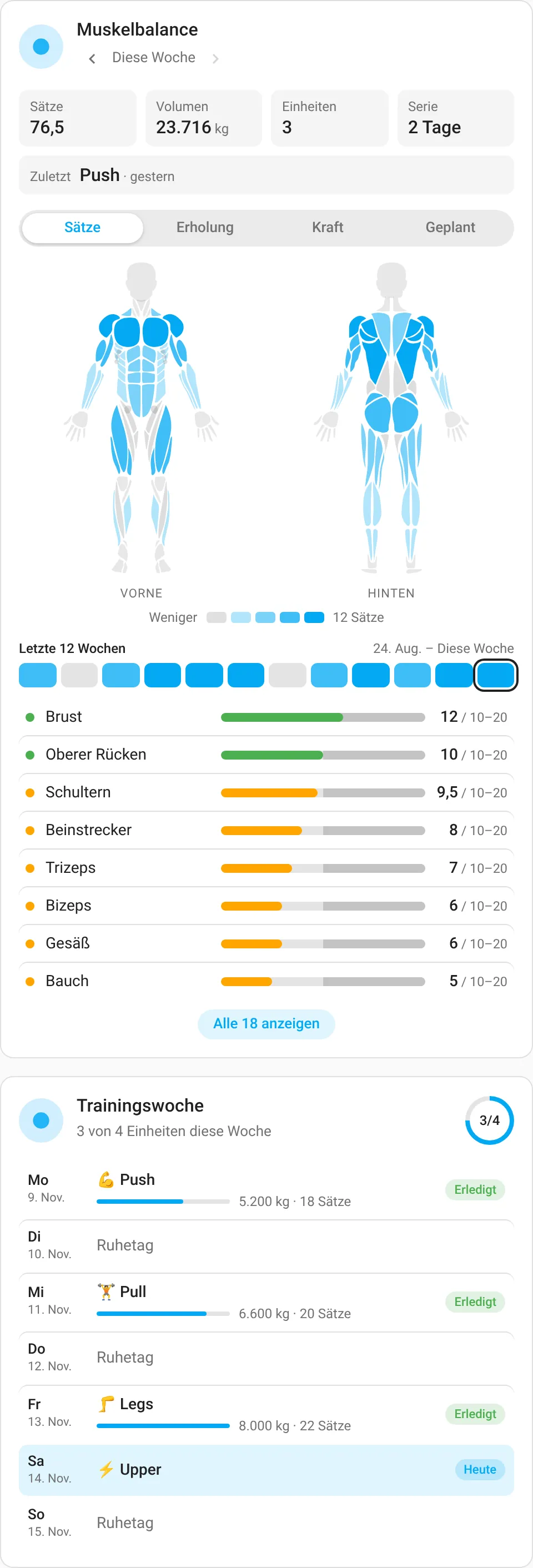
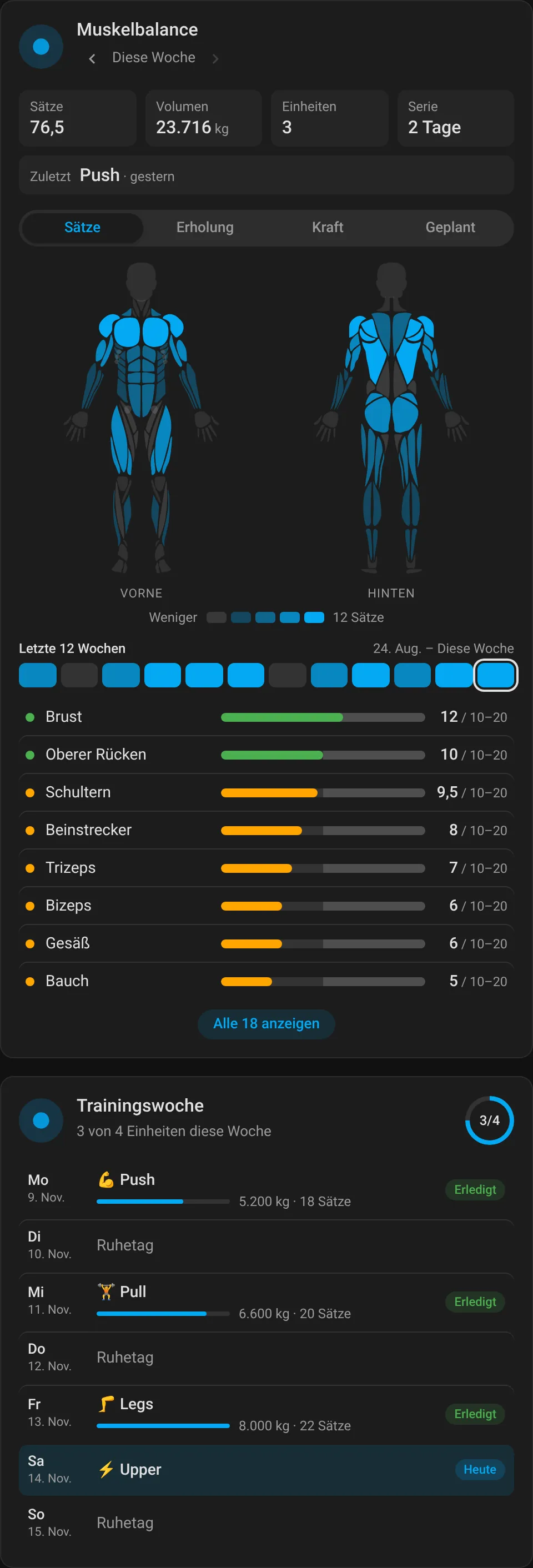
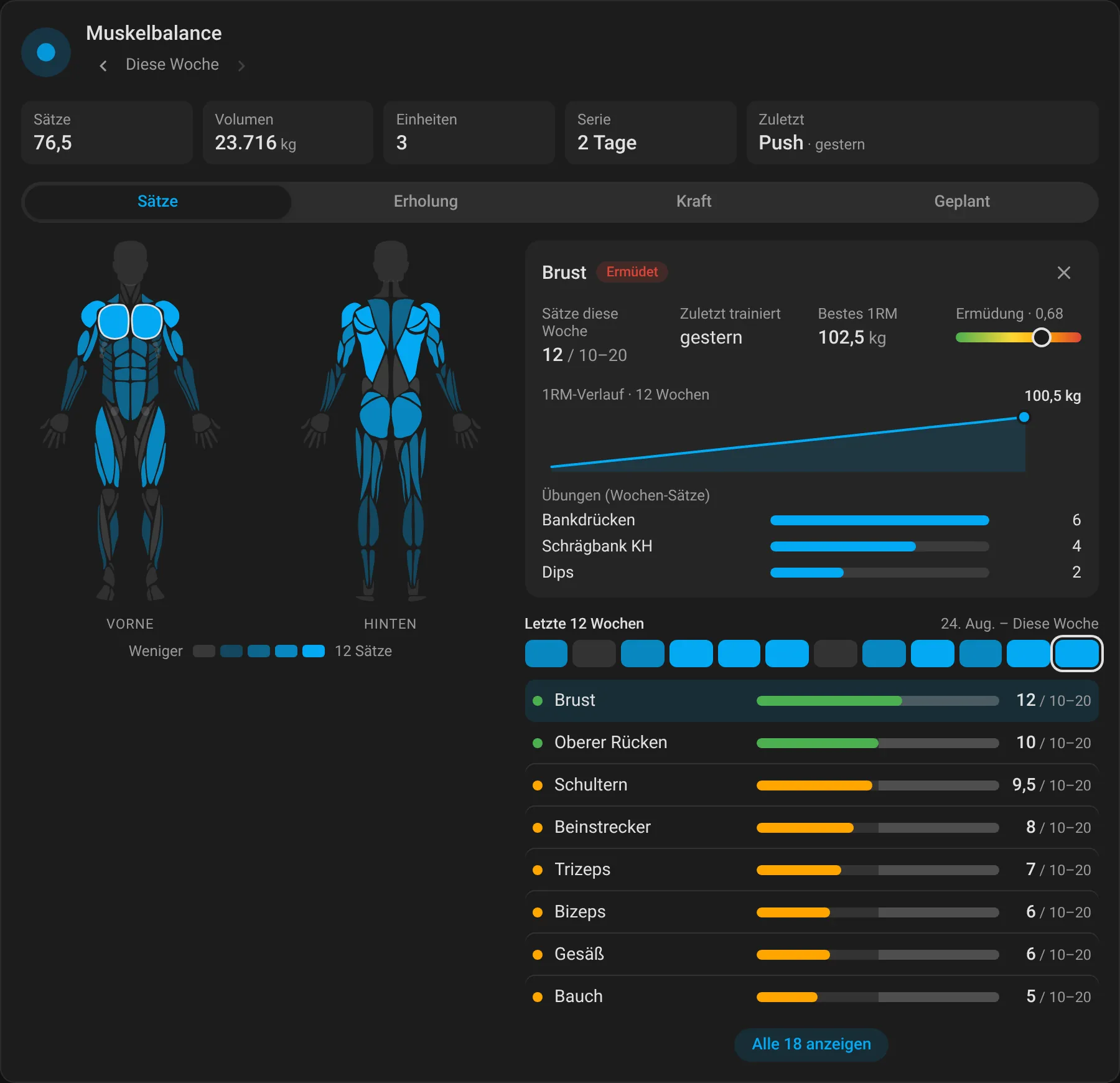
Since v0.8.0 the card does more than the openGym app at this point: week navigation with ‹ ›, a muscle detail panel (weekly sets, fatigue, 1RM sparkline, hitting exercises), a GitHub-style 12-week heatmap, a real half-life fatigue model per muscle group, bilingual names (de/en, following the HA language) and a stale-cache check after updates.
type: custom:opengym-muscle-card
entity: sensor.opengym_muscle_balance   # default, may be omitted
body: male          # male | female
mode: sets          # sets | recovery | strength | planned
show_heatmap: true  # 12-week heatmap
show_detail: true   # detail panel on muscle click
accent: "#a3e635"   # own accent color (default: HA primary)
Plus the week card — plan and reality side by side:
type: custom:opengym-week-card
entity: sensor.opengym_muscle_balance
days: 14            # days from Monday of this week (1–14)
title: Trainingswoche
💡 Automation examples
Lights on when the workout is done:
automation:
  - alias: "Workout geschafft"
    triggers:
      - trigger: device
        device_id: !device_id opengym
        domain: opengym
        type: workout_finished
    actions:
      - action: light.turn_on
        target: { entity_id: light.wohnzimmer }
        data:
          brightness: 200
Reminder when nothing happened for too long:
automation:
  - alias: "Ab ins Gym"
    triggers:
      - trigger: state
        entity_id: sensor.opengym_days_since_workout
        above: 4
    actions:
      - action: notify.mobile_app
        data:
          message: "Seit 5 Tagen kein Training. Nächste Einheit: {{ states('sensor.opengym_next_session') }}"
Write the scale back to openGym automatically:
automation:
  - alias: "Morgendliche Waage"
    triggers:
      - trigger: state
        entity_id: sensor.smart_scale_weight
    actions:
      - action: opengym.log_weighin
        data:
          weight: "{{ trigger.to_state.state | float }}"
⚠️ Notes
- openGym serves webhooks over HTTPS — or plain
http://into the LAN withINTEGRATIONS_ALLOW_LAN=1. - Delivery is “at least once” — duplicates are recognizable via
event_id. - The poll interval (default 15 min) is adjustable in the integration’s options.
binary_sensor.opengym_active_workoutneeds admin rights on the openGym instance — without them the sensor stays unavailable.
📄 License
This integration: MIT. openGym itself is AGPL-3.0; the shown logo is the official openGym icon from DuarteSantos8/openGym.
openGym for Home Assistant on GitHub
Source code, releases, issues and the full README. Mirrored on our own Forgejo instance.